







Adobe InDesign CC
Adobe InDesign CC
The book you're reading about right now was created with Adobe InDesign CC. And that's the case no matter which reading format you prefer--whether it's the physical book made of plant fiber and ink, or the digital version made of electrons in an e-reader. In fact, most of the books, magazines, posters, and brochures you see were likely made with InDesign as well. It's all around you.
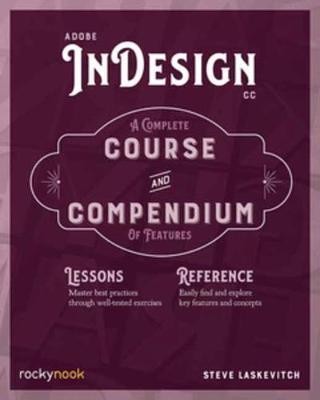
Adobe InDesign CC: A Complete Course and Compendium of Features is your guide to building publications great or small in this ubiquitous page layout application. First, with a complete Course that includes a set of projects and lessons derived from the curriculum of award-winning and Adobe Certified Instructor Steve Laskevitch, you will learn the procedures needed to use InDesign professionally. Dozens of lessons are included that can be applied to any document you have in mind: engineering proposals, marketing collateral, spec sheets, magazines, newsletters, books, and more. Through these step-by-step lessons, you'll be exposed to all of InDesign's features in practical contexts and its best practices for publishing workflows.
To complete the Course, we'll supply lesson documents and their assets to download. These can even serve as starting points for your own projects.
Then, for greater depth of knowledge and subsequent reference, you'll use the Compendium to uncover more of the "how" and "why" of InDesign and publishing tech in general. With each topic easy to access, you can find and explore all of InDesign's key features and concepts in depth. With cross references between the Course and Compendium, the two parts of the book complement each other perfectly. Best of all, when the lessons in the Course are done, the Compendium will continue to serve for months and years to come.
Learn step by step how to:
- Create documents from postcards and posters to large books - Take control of typography and more with styles - Combine images with text for compelling layouts - U
Adobe InDesign CC: A Complete Course and Compendium of Features is your guide to building publications great or small in this ubiquitous page layout application. First, with a complete Course that includes a set of projects and lessons derived from the curriculum of award-winning and Adobe Certified Instructor Steve Laskevitch, you will learn the procedures needed to use InDesign professionally. Dozens of lessons are included that can be applied to any document you have in mind: engineering proposals, marketing collateral, spec sheets, magazines, newsletters, books, and more. Through these step-by-step lessons, you'll be exposed to all of InDesign's features in practical contexts and its best practices for publishing workflows.
To complete the Course, we'll supply lesson documents and their assets to download. These can even serve as starting points for your own projects.
Then, for greater depth of knowledge and subsequent reference, you'll use the Compendium to uncover more of the "how" and "why" of InDesign and publishing tech in general. With each topic easy to access, you can find and explore all of InDesign's key features and concepts in depth. With cross references between the Course and Compendium, the two parts of the book complement each other perfectly. Best of all, when the lessons in the Course are done, the Compendium will continue to serve for months and years to come.
Learn step by step how to:
- Create documents from postcards and posters to large books - Take control of typography and more with styles - Combine images with text for compelling layouts - U
PRP: 309.69 Lei

Acesta este Prețul Recomandat de Producător. Prețul de vânzare al produsului este afișat mai jos.
247.75Lei
247.75Lei
309.69 LeiPrimești 247 puncte

Indisponibil
Descrierea produsului
The book you're reading about right now was created with Adobe InDesign CC. And that's the case no matter which reading format you prefer--whether it's the physical book made of plant fiber and ink, or the digital version made of electrons in an e-reader. In fact, most of the books, magazines, posters, and brochures you see were likely made with InDesign as well. It's all around you.
Adobe InDesign CC: A Complete Course and Compendium of Features is your guide to building publications great or small in this ubiquitous page layout application. First, with a complete Course that includes a set of projects and lessons derived from the curriculum of award-winning and Adobe Certified Instructor Steve Laskevitch, you will learn the procedures needed to use InDesign professionally. Dozens of lessons are included that can be applied to any document you have in mind: engineering proposals, marketing collateral, spec sheets, magazines, newsletters, books, and more. Through these step-by-step lessons, you'll be exposed to all of InDesign's features in practical contexts and its best practices for publishing workflows.
To complete the Course, we'll supply lesson documents and their assets to download. These can even serve as starting points for your own projects.
Then, for greater depth of knowledge and subsequent reference, you'll use the Compendium to uncover more of the "how" and "why" of InDesign and publishing tech in general. With each topic easy to access, you can find and explore all of InDesign's key features and concepts in depth. With cross references between the Course and Compendium, the two parts of the book complement each other perfectly. Best of all, when the lessons in the Course are done, the Compendium will continue to serve for months and years to come.
Learn step by step how to:
- Create documents from postcards and posters to large books - Take control of typography and more with styles - Combine images with text for compelling layouts - U
Adobe InDesign CC: A Complete Course and Compendium of Features is your guide to building publications great or small in this ubiquitous page layout application. First, with a complete Course that includes a set of projects and lessons derived from the curriculum of award-winning and Adobe Certified Instructor Steve Laskevitch, you will learn the procedures needed to use InDesign professionally. Dozens of lessons are included that can be applied to any document you have in mind: engineering proposals, marketing collateral, spec sheets, magazines, newsletters, books, and more. Through these step-by-step lessons, you'll be exposed to all of InDesign's features in practical contexts and its best practices for publishing workflows.
To complete the Course, we'll supply lesson documents and their assets to download. These can even serve as starting points for your own projects.
Then, for greater depth of knowledge and subsequent reference, you'll use the Compendium to uncover more of the "how" and "why" of InDesign and publishing tech in general. With each topic easy to access, you can find and explore all of InDesign's key features and concepts in depth. With cross references between the Course and Compendium, the two parts of the book complement each other perfectly. Best of all, when the lessons in the Course are done, the Compendium will continue to serve for months and years to come.
Learn step by step how to:
- Create documents from postcards and posters to large books - Take control of typography and more with styles - Combine images with text for compelling layouts - U
Detaliile produsului